
You can change your default search engine in a browser from one that follows you and records all your searches for sale to the highest bidder, to one that protects your privacy.
First, some articles on protecting your online privacy are at https://spreadprivacy.com/tag/privacy-newsletter. Articles include:
- Privacy Mythbusting #4: I can’t be identified just by browsing a website. (If only!)
- Privacy Mythbusting #5: I own my personal information. (Not as much as you think.)
- Privacy Mythbusting #2: My password keeps me safe. (Not necessarily!)
- Are Ads Costing You Money?
- Are Ads Following You?
Instructions on changing your default search engine on a Mac:
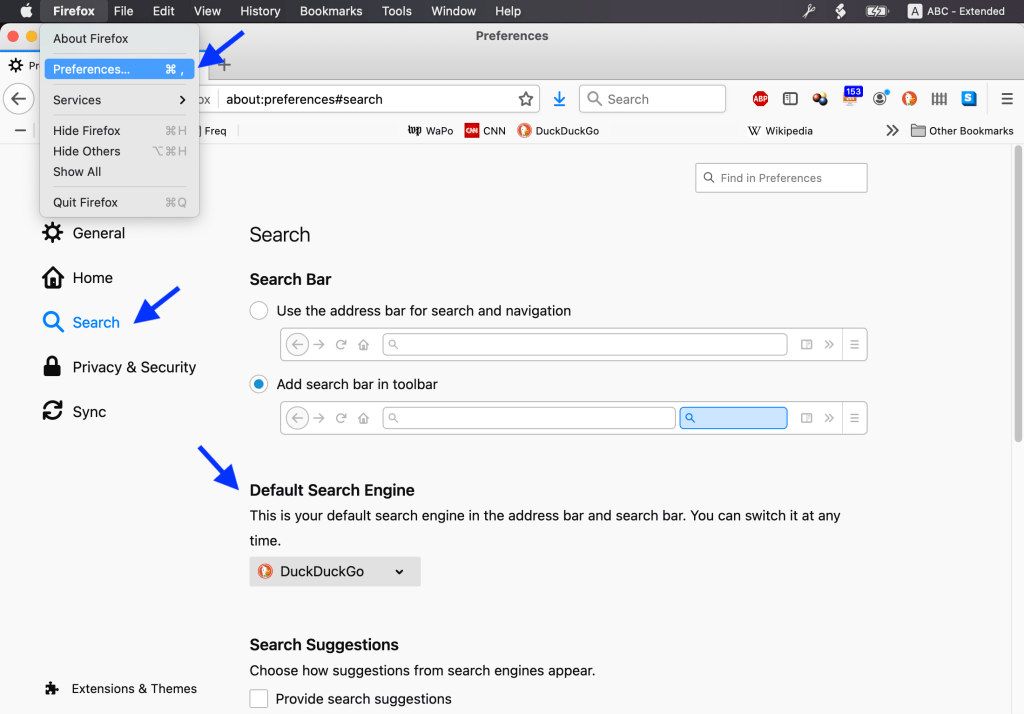
Firefox: Firefox ➞ Preferences ➞ Search ➞ Default Search Engine and select DuckDuckGo.
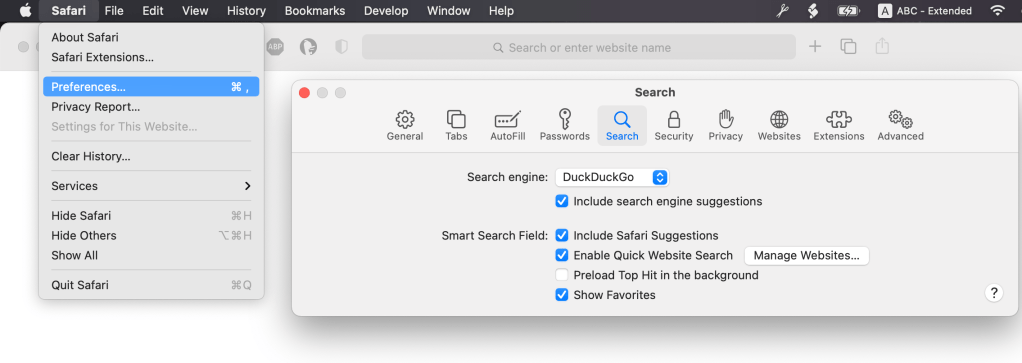
Safari: ➞ Preferences ➞ Search ➞ Search engine and select DuckDuckGo.
Setting your default search engine in other browsers, or browsers under Windows, will be similar but probably a little more complicated. Click this: https://duckduckgo.com/?q=default+search+engine+windows to search for instructions.
 Laugh / learn links log