404 page not found

No no, you got here correctly!

“404” is the HTTP error code that a website sends to you (well, to your browser) if you try to read a page that doesn’t exist. Normally it means that you typed the link incorrectly, or that the page has been renamed or deleted. The website can, however, redirect you to a special page to explain the problem. Some of them are funny:

Financial Times: https://www.ft.com/sljdfsdfh (you can type any garbage at the end):

Why wasn’t this page found?

We asked some leading economists.

Stagflation: The cost of pages rose drastically, while the page production rate slowed down.

General economics: There was no market for it.

Liquidity traps: We injected some extra money into the technology team but there was little or no interest so they simply kept it, thus failing to stimulate the page economy. (etc)

Bernie Sanders: https://berniesanders.com/lajsdklajsdlas.

Analog Devices: https://www.analog.com/en/products/xyzad5423.html.

FloatHub: https://floathub.com/foobar.

And more, with some discussion: https://news.ycombinator.com/item?id=20489668.

Making DuckDuckGo your search engine

You can change your default search engine in a browser from one that follows you and records all your searches for sale to the highest bidder, to one that protects your privacy.

First, some articles on protecting your online privacy are at https://spreadprivacy.com/tag/privacy-newsletter. Articles include:

  • Privacy Mythbusting #4: I can’t be identified just by browsing a website. (If only!)
  • Privacy Mythbusting #5: I own my personal information. (Not as much as you think.)
  • Privacy Mythbusting #2: My password keeps me safe. (Not necessarily!)
  • Are Ads Costing You Money?
  • Are Ads Following You?

Instructions on changing your default search engine on a Mac:

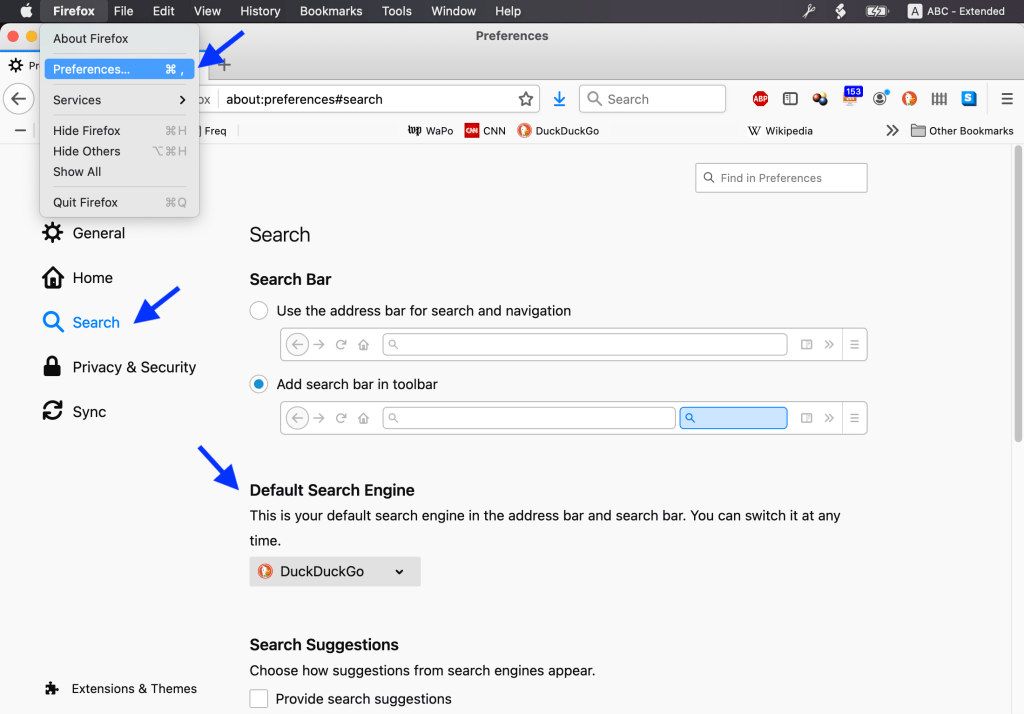
Firefox: Firefox ➞ Preferences ➞ Search ➞ Default Search Engine and select DuckDuckGo.

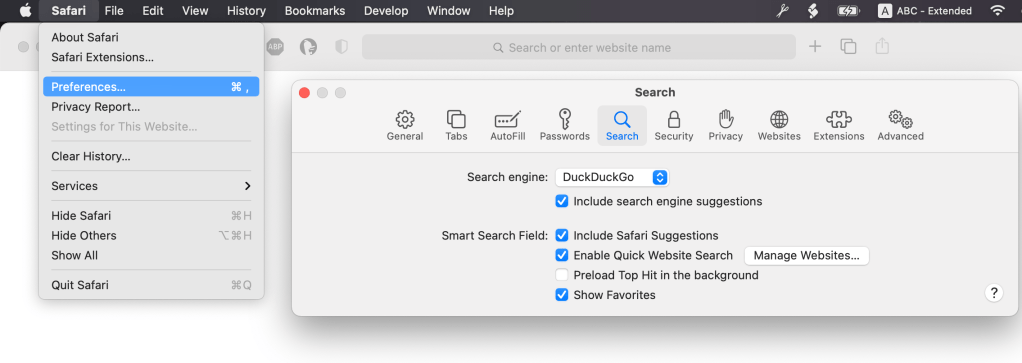
Safari: ➞ Preferences ➞ Search ➞ Search engine and select DuckDuckGo.

Setting your default search engine in other browsers, or browsers under Windows, will be similar but probably a little more complicated. Click this: https://duckduckgo.com/?q=default+search+engine+windows to search for instructions.

Yes, they are spying on you

At least 87 percent of the world’s most-popular Web domains engage in some form of digital tracking without you ever signing in, according to investigative journalism nonprofit the Markup. Many, it found, even covertly record the way you move your mouse or type. This is the hidden tech that lets companies learn who you are, what you like and even the secrets you look at online so they can tailor what you see, make ads follow you around — or even sell your information to others.

The good news: You can run a privacy check on any site yourself by using the free tool made for the audit, called Blacklight.

Click here: https://themarkup.org/blacklight, type in a web address (eg cnn.com), and shudder.

The semi-good news:

There are steps you can take to protect your privacy on the Web.

For most people, I recommend making one simple change: switch browsers to one that includes automatic protection. I like Mozilla’s Firefox, but Apple’s Safari and the new version of Microsoft Edge also provide some protection, as do the privacy-focused DuckDuckGo and Brave.

I mostly use DuckDuckGo myself (DuckDuckGo.com). Original article: https://www.washingtonpost.com/technology/2020/09/25/privacy-check-blacklight/.

How to protect yourself from Google’s surveillance program

Why yes, everyone is spying on you. Or at least Google is:

It’s a scary thought: You and your friends are marching for gun control, climate action or social justice when a crime happens a mile or two away. Now you and the thousands of people who attended are suspects. And guess who turned you in: Google.

That’s because Google knows where you are right now, even if location tracking on your Google apps is turned off. And the company is handing over your location information to law enforcement agencies.

Google calls this program “Sensorvault” and its use by law enforcement for nearly 10 years was a well-kept secret until the New York Times recently exposed Google’s operation.

https://blog.credo.com/2019/10/how-to-protect-yourself-from-googles-sensorvault-surveillance-program/

Note. I have started using duckduckgo.com for most of my searches instead of Google, because they promise that they are protecting my privacy. Search results seem to be roughly as good as Google. You should be able to set this as your preferred search engine somewhere in “Preferences” for your web browser (Firefox, Safari, Chrome etc).

How to turn off smart TV snooping features

A technology called automatic content recognition, or ACR, attempts to identify every show you play—including those you get via cable, over-the-air broadcasts, streaming services, and even DVDs and Blu-ray discs. The data is transmitted to the TV maker, one of its business partners, or both.

ACR helps the TV recommend other shows you might want to watch. But the data can also used for targeting ads to you and your family, and for other marketing purposes. You can’t easily review or delete this data later.

https://www.consumerreports.org/privacy/how-to-turn-off-smart-tv-snooping-features/

Thanks a bunch, Verizon

A couple of years ago, Verizon purchased Yahoo. One of Yahoo’s features was Yahoo!Groups, a way to set up an email list for a group of people. It saved all the messages so you could read them with a web browser instead of getting emails, or review them later; it included ways to conduct polls (“Should we do dinner next Sunday at (a) McDonald’s, (b) Uno’s, (c) etc”); it let you save photos or images related to the group; and various other things. Millions of groups were created for everything from fans for a particular TV show to members of a real-life group to religions to finance (Wikipedia article).

Recently, Yahoo (owned by Verizon, remember) decided to drop all the features except the basic email list: whatever you email to your group still goes out to everyone, but Yahoo (owned by Verizon) will no longer save the emails, and your photos or whatever are gone. They gave users a few weeks to download stuff. I downloaded the group of my family’s relatives. We had used this since 2002 to chat about marriages and new jobs and deaths, and the occasional digression into politics.

UPDATE: I thought that several years of messages had not been downloaded. They were. I managed to lose them, my fault. (And just found them again.) Some apologies to Yahoo (owned by Verizon). I’ve toned down this posting a little.

I’m sure this is saving Yahoo (owned by Verizon) millions of dollars. And I’m sure this is going directly into the pocket of Hans Vestberg, the CEO of Verizon.

Thanks a bunch, Verizon. Remind me to never spend one cent with anything related to your company again.

Google vs privacy

Over a recent week of Web surfing, I peered under the hood of Google Chrome and found it brought along a few thousand friends. Shopping, news and even government sites quietly tagged my browser to let ad and data companies ride shotgun while I clicked around the Web.

This was made possible by the Web’s biggest snoop of all: Google. Seen from the inside, its Chrome browser looks a lot like surveillance software.Our latest privacy experiment found Chrome ushered more than 11,000 tracker cookies into our browser — in a single week. Here’s why Firefox is better.

https://www.washingtonpost.com/technology/2019/06/21/google-chrome-has-become-surveillance-software-its-time-switch

Corporate ADHD

Or, why I keep everything on my own machine, plus two backups (one in a fireproof box):

It’s only April, and 2019 has already been an absolutely brutal year for Google’s product portfolio. The Chromecast Audio was discontinued January 11. YouTube annotations were removed and deleted January 15. Google Fiber packed up and left a Fiber city on February 8. Android Things dropped IoT support on February 13. Google’s laptop and tablet division was reportedly slashed on March 12. Google Allo shut down on March 13. The “Spotlight Stories” VR studio closed its doors on March 14. The goo.gl URL shortener was cut off from new users on March 30. Gmail’s IFTTT support stopped working March 31.

And today, April 2, we’re having a Google Funeral double-header: both Google+ (for consumers) and Google Inbox are being laid to rest. Later this year, Google Hangouts “Classic” will start to wind down, and somehow also scheduled for 2019 is Google Music’s “migration” to YouTube Music, with the Google service being put on death row sometime afterward.

https://arstechnica.com/gadgets/2019/04/googles-constant-product-shutdowns-are-damaging-its-brand/