Scamming the scammers

Apate’s aim is to defeat global phone scams with conversational AI, taking advantage of systems already in place where telecommunications companies divert calls they can identify as coming from scammers.

Kafaar was inspired to turn the tables on telephone fraudsters after he played a “dad’s joke” on a scam caller in front of his two kids while they enjoyed a picnic in the sun. With inane chatter, he kept the scammer on the line. “The kids had a very good laugh,” he says. “And I was thinking the purpose was to deceive the scammer, to waste their time so they don’t talk to others.

“Scamming the scammers, if you like.”

So AI bots are wasting the scammer’s time, and (I like this bit particularly) they are learning what is most effective at doing that. Link (1,100 words): https://www.theguardian.com/technology/article/2024/jul/07/ai-chatbots-phone-scams.

Scammers are trying to make a “sale.” If you waste their time, they can’t be scamming someone else. My own experience is that a phone scammer usually asks for the expiration date on my credit card early in the conversation, so I just say, “Oh, the card’s in the other room, hold on a second.” Then I put the phone on the desk and go on with other stuff for ten minutes.

Some things to watch for:

  • Scammers can use a fake Caller ID. The number that is displayed is not trustworthy.
  • Government agencies don’t contact you via phone. I got a very realistic-sounding scammer pretending to need my Medicare number in order to send me a new card. She even knew the first two and last two letters/numbers… which in fact are the same for everyone, or something. (I told her I’d check with the Social Security website.)
  • “Windows” doesn’t call you either. It’s a scam.
  • If you think a caller is a scammer, don’t even pick up. That tells them that at least they found a real person, and you’ll get more calls. (Unless you want to chat and waste their time.) A real person will leave voicemail.
  • Never use the word “Yes” with a phone scammer. Supposedly this can be recorded as proof that you agreed to sign up for something.
  • Email: No real site will email you asking you to enter a password. Hover your mouse over the link. That will show you the actual link, which can be entirely different from the displayed link.

And just two of many good news items from Fix the News:

A ‘liberal, democratic, non-discriminatory, non-sectarian Bangladesh’
Following the ‘people’s victory‘ after student protests in July, the country’s new caretaker leader, Nobel Prize winner Muhammad Yunus, has called for a ‘new Bangladesh‘, promising free, fair, and participatory elections and emphasising the role of citizens in deciding the government’s fate. It’s still early days—but if even half those promises are met, it will be a huge victory for democracy. Time

US cancer death rates have fallen by a third since 1999
A new CDC report has found that cancer death rates dropped from 200.7 per 100,000 people in 1999 to 142 per 100,000 in 2022. This equates to roughly three million additional Americans alive today due to reduced cancer death rates over the past two decades. The decrease is credited to advances in treatment, technological innovations, and lower smoking rates. Baltimore Sun
Every tech support task you should do for your family

How to save money, prevent hacks and make everything work smoothly.

Like getting your teeth cleaned or emptying the gutters, there are a number of digital maintenance tasks everyone should see to once or twice a year.

  • Update all the software.
  • Make sure contact emails are up-to-date.
  • Turn on two-factor authentication.
  • Set up a password system.
  • See if the storage is full.
  • Set up automatic backups. (In my opinion, this should be the very first priority.)
  • Adjust accessibility features.
  • Scan for any malware or adware.
  • Cancel unwanted subscriptions.
  • Organize cable and streaming services.
  • Check the cable, Internet and phone bill.
  • Add legacy contacts.
  • Lock down all the privacy settings.
  • Set up computers so you can help remotely.
  • Find local tech support.
  • Clear out old unwanted tech.
  • Set up any holiday tech gifts.
  • Review common scams.

Each of these tips has an explanation of why it’s important and how to do it. Yes, it’s a lot of items, but doing as many as you can will help, and you can do (for example) one item a week. 1,600 words: https://www.washingtonpost.com/technology/2021/12/20/tech-support-checklist/.

How to reduce Facebook tracking

Let’s face it. You’re not paying for Facebook, right? Therefore you are not the customer. You are the product.

Facebook even tracks you when you are on non-Facebook sites so they can sell your information to advertisers.

Here are seven steps to stop Facebook tracking, starting with the nuclear option. ((Each step has details in the article.))

1. Quit Facebook and Instagram

2. Change these Facebook privacy settings

3. Limit app tracking on your phone

4. Bolster your Web browser

5. Block more app trackers

6. Obscure your email

7. Tell companies to stop selling your data

https://www.washingtonpost.com/technology/2021/08/29/stop-facebook-tracking/. About 1,400 words.

The Facebook Papers

Just some of the revelations about how Facebook operates:

Facebook fails to moderate harmful content in developing countries

When a pair of Facebook researchers created a dummy account in 2019 to test how users in Kerala, India, experienced the social media site, they found a staggering amount of hate speech, misinformation and calls for violence on the platform. “I’ve seen more images of dead people in the past three weeks than I’ve seen in my entire life total,” the researcher wrote.

Facebook AI struggles with non-English languages

A document showed that in 2020, the company did not have screening algorithms to find misinformation in Burmese, the language of Myanmar, or hate speech in the Ethiopian languages of Oromo or Amharic.

Facebook labeled election misinformation as “harmful, non-violating” content

“Harmful but non-violating”? Really?

Facebook was aware that maids were being sold on its platform

Apple threatened to remove Facebook and Instagram from its app store over the issue, but changed course after the social media giant removed 1,000 accounts linked to the sale of maids from its platform.

Facebook internally debated removing the Like button

When asked why Facebook hasn’t made Instagram safer for children, Haugen said during her testimony that the company knows “young users are the future of the platform and the earlier they get them the more likely they’ll get them hooked.”

https://time.com/6110234/facebook-papers-testimony-explained/

Making DuckDuckGo your search engine

You can change your default search engine in a browser from one that follows you and records all your searches for sale to the highest bidder, to one that protects your privacy.

First, some articles on protecting your online privacy are at https://spreadprivacy.com/tag/privacy-newsletter. Articles include:

  • Privacy Mythbusting #4: I can’t be identified just by browsing a website. (If only!)
  • Privacy Mythbusting #5: I own my personal information. (Not as much as you think.)
  • Privacy Mythbusting #2: My password keeps me safe. (Not necessarily!)
  • Are Ads Costing You Money?
  • Are Ads Following You?

Instructions on changing your default search engine on a Mac:

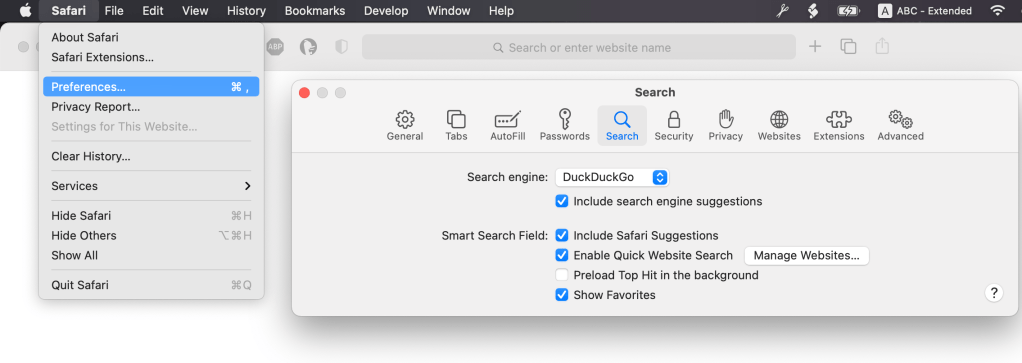
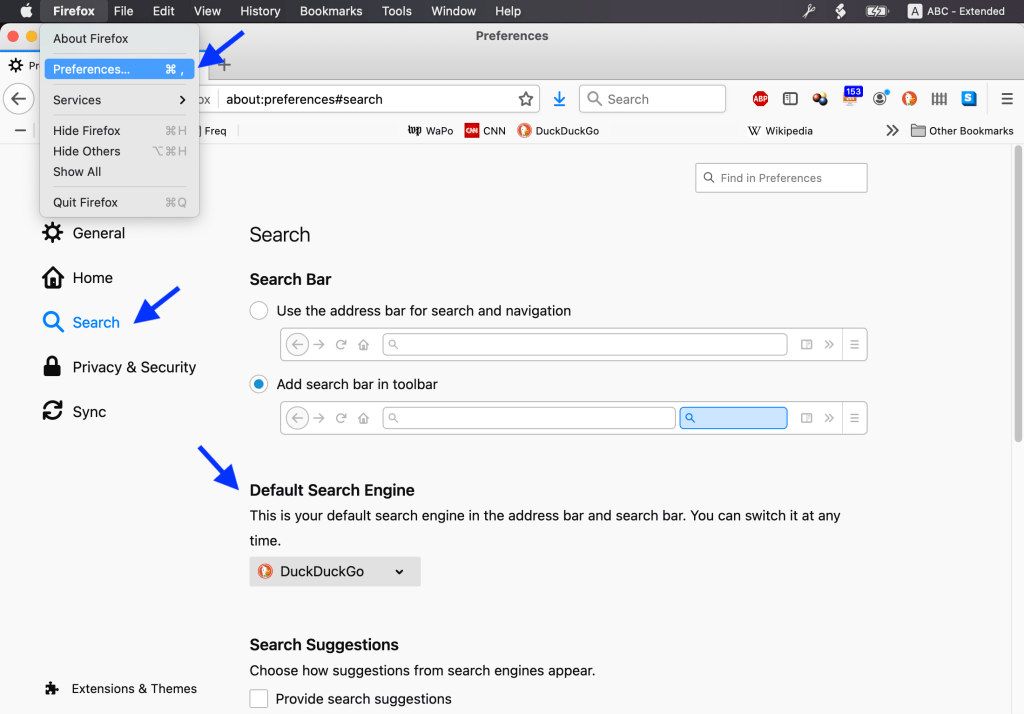
Firefox: Firefox ➞ Preferences ➞ Search ➞ Default Search Engine and select DuckDuckGo.

Safari: ➞ Preferences ➞ Search ➞ Search engine and select DuckDuckGo.

Setting your default search engine in other browsers, or browsers under Windows, will be similar but probably a little more complicated. Click this: https://duckduckgo.com/?q=default+search+engine+windows to search for instructions.

Yes, they are spying on you

At least 87 percent of the world’s most-popular Web domains engage in some form of digital tracking without you ever signing in, according to investigative journalism nonprofit the Markup. Many, it found, even covertly record the way you move your mouse or type. This is the hidden tech that lets companies learn who you are, what you like and even the secrets you look at online so they can tailor what you see, make ads follow you around — or even sell your information to others.

The good news: You can run a privacy check on any site yourself by using the free tool made for the audit, called Blacklight.

Click here: https://themarkup.org/blacklight, type in a web address (eg cnn.com), and shudder.

The semi-good news:

There are steps you can take to protect your privacy on the Web.

For most people, I recommend making one simple change: switch browsers to one that includes automatic protection. I like Mozilla’s Firefox, but Apple’s Safari and the new version of Microsoft Edge also provide some protection, as do the privacy-focused DuckDuckGo and Brave.

I mostly use DuckDuckGo myself (DuckDuckGo.com). Original article: https://www.washingtonpost.com/technology/2020/09/25/privacy-check-blacklight/.

How to protect yourself from Google’s surveillance program

Why yes, everyone is spying on you. Or at least Google is:

It’s a scary thought: You and your friends are marching for gun control, climate action or social justice when a crime happens a mile or two away. Now you and the thousands of people who attended are suspects. And guess who turned you in: Google.

That’s because Google knows where you are right now, even if location tracking on your Google apps is turned off. And the company is handing over your location information to law enforcement agencies.

Google calls this program “Sensorvault” and its use by law enforcement for nearly 10 years was a well-kept secret until the New York Times recently exposed Google’s operation.

https://blog.credo.com/2019/10/how-to-protect-yourself-from-googles-sensorvault-surveillance-program/

Note. I have started using duckduckgo.com for most of my searches instead of Google, because they promise that they are protecting my privacy. Search results seem to be roughly as good as Google. You should be able to set this as your preferred search engine somewhere in “Preferences” for your web browser (Firefox, Safari, Chrome etc).

How to turn off smart TV snooping features

A technology called automatic content recognition, or ACR, attempts to identify every show you play—including those you get via cable, over-the-air broadcasts, streaming services, and even DVDs and Blu-ray discs. The data is transmitted to the TV maker, one of its business partners, or both.

ACR helps the TV recommend other shows you might want to watch. But the data can also used for targeting ads to you and your family, and for other marketing purposes. You can’t easily review or delete this data later.

https://www.consumerreports.org/privacy/how-to-turn-off-smart-tv-snooping-features/

Google vs privacy

Over a recent week of Web surfing, I peered under the hood of Google Chrome and found it brought along a few thousand friends. Shopping, news and even government sites quietly tagged my browser to let ad and data companies ride shotgun while I clicked around the Web.

This was made possible by the Web’s biggest snoop of all: Google. Seen from the inside, its Chrome browser looks a lot like surveillance software.Our latest privacy experiment found Chrome ushered more than 11,000 tracker cookies into our browser — in a single week. Here’s why Firefox is better.

https://www.washingtonpost.com/technology/2019/06/21/google-chrome-has-become-surveillance-software-its-time-switch